
Author and install a user extension
Plexus ships first-party sources (Obsidian, Apple Calendar/Reminders/Notes/Mail/Contacts/Photos, Shortcuts, browser, browser control, Claude Code). A user extension is how you — or a coding agent acting for you — add a capability the gateway doesn't ship: a manifest you write, validate, and install at runtime. Once installed it hot-loads with no restart, lands under the Extensions tier in the admin UI, appears in an agent's manifest as soon as you authorize it for that agent, and can be granted and called like any other capability.
This tutorial walks the full lifecycle using the canonical "vault write" example:
write manifest → plexus extension preview → plexus extension add → see it in /admin → grant + invoke…then shows the "author an extension by talking to it" path: a coding agent (Codex / Claude Code) reads the served authoring guide and writes the manifest for you from a plain-English description.
Prerequisites
A running gateway (see Get running) and the shared plexus admin CLI, which ships in the repo. Run it from a repo checkout — bun run packages/cli/src/bin/plexus <args> — the plexus extension … commands below are shorthand for exactly that (alias it once: alias plexus="bun run <repo>/packages/cli/src/bin/plexus"). The CLI reads the connection-key from ~/.plexus/connection-key automatically. The authoring guide is the full manifest contract; the spec is the schema reference.
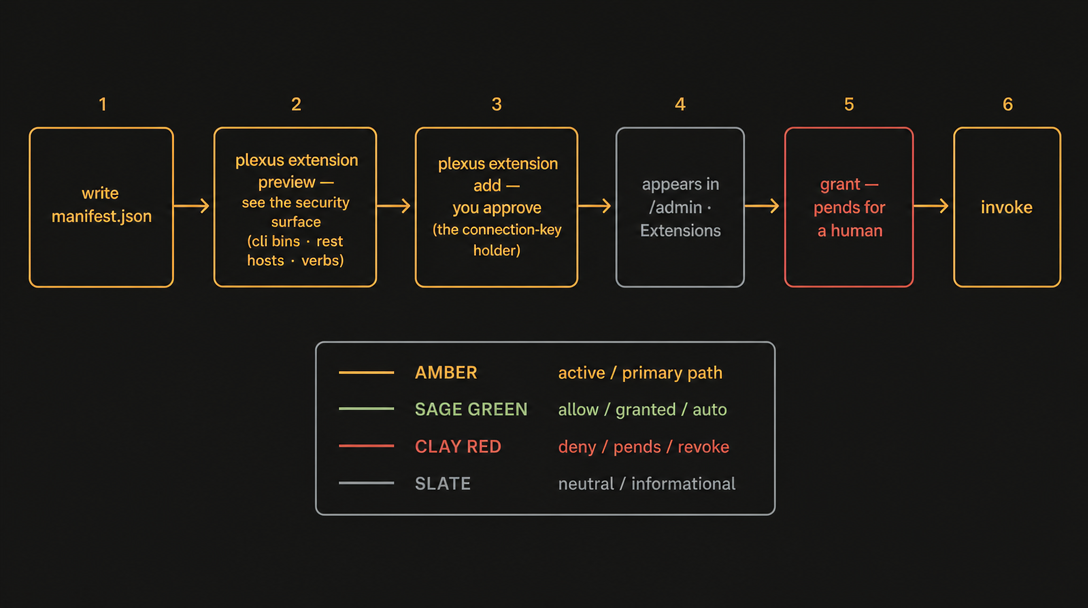
1. Write the manifest — a vault that can read and write
This is the worked example from the authoring guide. It declares a local-rest source (my-vault) with three entries: a read capability, a write capability, and a usage skill. Save it as my-vault.json:
{
  "manifest": "plexus-extension/0.1",
  "source": "my-vault",
  "label": "My local vault",
  "transport": "local-rest",
  "secrets": [{ "name": "my-vault-key", "attach": "bearer" }],
  "capabilities": [
    {
      "name": "notes.read",
      "kind": "capability",
      "label": "Read a note",
      "describe": "Read the markdown of a note at {path}. Use to fetch existing note content.",
      "io": { "input": { "type": "object", "properties": { "path": { "type": "string" } }, "required": ["path"] } },
      "grants": ["read"],
      "transport": "local-rest",
      "route": {
        "baseUrl": "http://127.0.0.1:27123",
        "allowedHosts": ["127.0.0.1:27123"],
        "method": "GET",
        "pathTemplate": "/vault/{path}",
        "secret": { "name": "my-vault-key", "attach": "bearer" }
      }
    },
    {
      "name": "notes.write",
      "kind": "capability",
      "label": "Write a note",
      "describe": "Create or overwrite the note at {path} with {content}. Use when saving content the user dictated.",
      "io": { "input": { "type": "object", "properties": { "path": { "type": "string" }, "content": { "type": "string" } }, "required": ["path", "content"] } },
      "grants": ["write"],
      "transport": "local-rest",
      "route": {
        "baseUrl": "http://127.0.0.1:27123",
        "allowedHosts": ["127.0.0.1:27123"],
        "method": "PUT",
        "pathTemplate": "/vault/{path}",
        "body": "{content}",
        "secret": { "name": "my-vault-key", "attach": "bearer" }
      }
    },
    {
      "name": "notes.howto",
      "kind": "skill",
      "label": "How to use my-vault",
      "describe": "Usage guidance for my-vault.notes.read / notes.write.",
      "grants": [],
      "transport": "skill",
      "body": { "format": "markdown", "markdown": "# my-vault\nRead with `notes.read { path }`; write with `notes.write { path, content }`. Paths are relative to the vault root." }
    }
  ]
}
What the fields mean (full reference: the spec):
| Field | Required | Meaning |
|---|---|---|
manifest | yes | Schema version — the literal "plexus-extension/0.1". |
source | yes | The source id; every entry id becomes <source>.<name>. |
label | yes | Human-readable source label. |
transport | yes | Default transport (local-rest | stdio | ipc | cli | skill | workflow). |
capabilities | yes | The entries this extension contributes (non-empty). |
secrets | no | Secret references — values live in ~/.plexus/secrets/, never in the manifest. |
Per capability: name (<noun>.<verb>), kind (capability | skill | workflow), label, describe (the agent-facing "what / when / how"), and grants — the verbs it needs (read | write | execute; [] = no grant). io carries JSON-Schema input/output; route is the transport's routing config (only the transport reads it). For a local-rest route the URL path key is pathTemplate (canonical; path is accepted as a legacy alias — prefer pathTemplate). A kind:"skill" entry ships an inline markdown body and is read as context, not invoked.
So my-vault contributes the ids my-vault.notes.read (read), my-vault.notes.write (write), and my-vault.notes.howto (skill).
The secret never goes in the manifest
The manifest only references a secret by name. Write the value into the gateway's write-only store first:
curl -s -H "Host: 127.0.0.1:7077" -H "content-type: application/json" \
  -H "X-Plexus-Connection-Key: $(cat ~/.plexus/connection-key)" \
  -X POST "http://127.0.0.1:7077/admin/api/secrets/my-vault-key" \
  -d '{"value":"YOUR-VAULT-API-KEY"}'
The value is written to ~/.plexus/secrets/my-vault-key (mode 0600) and is never returned over HTTP. route.baseUrl points at your own local write daemon (here a loopback service on 127.0.0.1:27123); allowedHosts pins the transport to loopback by default. A non-loopback host is opt-in: it requires an explicit, user-confirmed allowedHosts entry — that is the approval surface. A federated multi-host topology is a documented design direction (draft); see the federated mesh.
2. plexus extension preview — read the security surface
Validate the manifest and project its security surface without committing anything:
plexus extension preview ./my-vault.json✓ manifest is VALID
security surface:
source: my-vault (My local vault)
transport-backed: yes
capabilities (3):
• my-vault.notes.read [capability · local-rest · read] Read a note
• my-vault.notes.write [capability · local-rest · write] Write a note
• my-vault.notes.howto [skill · skill · (none)] How to use my-vault
rest hosts: 127.0.0.1:27123This calls POST /admin/api/extensions/preview and surfaces exactly what is worth scrutinizing before you trust an extension:
- the verbs each capability requires (here a
write), - the rest hosts it may reach (any non-loopback host is a red flag),
- the cli bins it may spawn (empty here, so the line is omitted — a
clitransport would list them), - cross-source skill attaches (a prompt-injection channel into other sources),
- whether it is transport-backed (reaches a real service, versus a pure skill).
If the manifest is invalid, you get ✗ manifest is INVALID: with the reasons and a non-zero exit (5); nothing is committed. Add --json for machine-readable output. Point at a non-default gateway with --url; override the key with --key.
3. plexus extension add — install it live
Once the surface looks right, install it. You — the local user on the connection-key-authenticated admin API — are the human approver, so the CLI commits the extension live and audits it:
plexus extension add ./my-vault.json✓ installed extension "my-vault" — revision 7
registered 3 capabilities: my-vault.notes.read, my-vault.notes.write, my-vault.notes.howtoThis calls POST /admin/api/extensions. The ids are live immediately — no gateway restart: they show up in the admin UI and are grantable right away, and they appear in an agent's manifest once you authorize them for that agent (connect-time subset selection, or an owner-issued standing grant). The install is also durable: the manifest is persisted to ~/.plexus/extensions.json and replayed on boot, so the extension survives a restart. You install it once, not on every launch. Confirm and manage from the terminal:
plexus extension list                 # GET  /admin/api/extensions
plexus extension remove my-vault      # DELETE /admin/api/extensions/my-vault (purges its grants)
Agent-side install (no admin key)
An agent in a live session can also register an extension over the protocol with POST /extensions { sessionId, manifest }. Because the extension is transport-backed, that path pends for a human (grant_pending_user): the user approves it in /admin before it goes live. That is the flow the acceptance harness exercises — tests/harnesses/acceptance/README.md (a codex agent authors a vault-write extension, it pends, the user approves, then it is invoked). The plexus extension add path above skips the pend precisely because the CLI is the admin surface, not an agent.
4. See it in the admin UI — the Extensions tier
Open the management UI and go to Create an extension in the sidebar:
http://127.0.0.1:7077/admin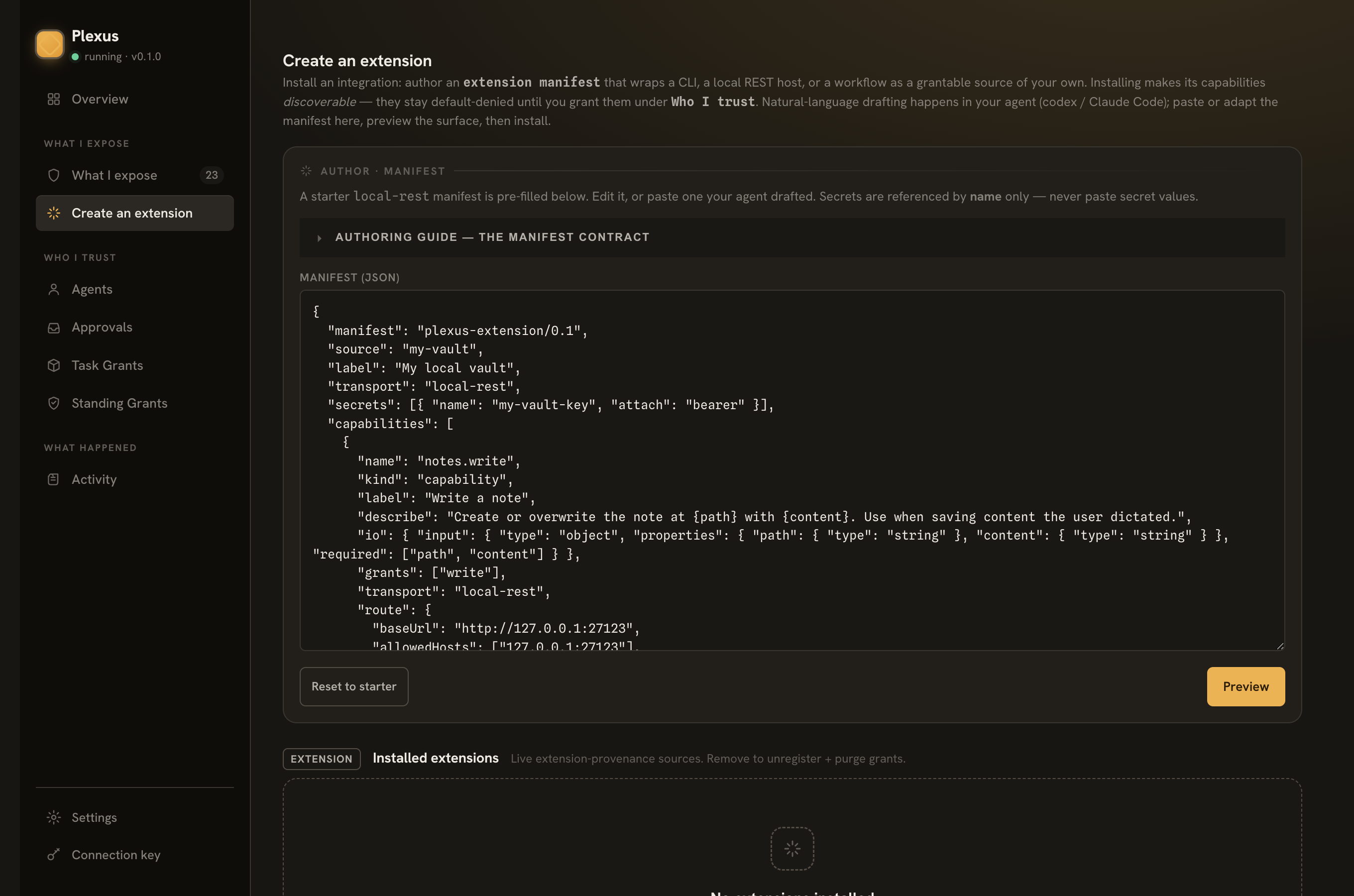
Paste a manifest, hit preview to see the same security surface, and install it. Installed extensions appear under Installed extensions, and their capabilities show up under the Extensions provenance tier wherever capabilities are listed ("What I expose"). Plexus uses three provenance tiers — First-party, Managed, and Extensions — and tags every extension-sourced capability, so the human always knows it was user-added by an agent:
Extension — user-added by an agent, so Plexus always checks with you.
That tagging is why any grant an agent requests on an extension capability pends for a human — not just writes. See step 5.
5. Grant + invoke the extension
Grant and call it exactly like any capability (full walkthrough in Connect an agent). Three things to expect:
- First, authorize the agent for the new ids. An agent's world is the capability subset you authorized for it: re-connect it with the new capabilities selected, or issue it a standing grant from the admin console. A grant request for a capability you never authorized for that agent is denied outright — not pended.
- Any extension grant the agent requests pends for approval — even a read. Extension provenance is treated as elevated, so the gateway defers to a human:
PUT /grantsreturnsgrant_pending_user, you approve in the Approvals tab (with a trust-window), and the token is minted. - The write is doubly gated —
my-vault.notes.writecarries awritegrant and is extension-sourced, so an agent-requested grant on it always pends.
Once the agent is authorized, from a coding agent the whole thing is one shell call (when a grant is needed, the CLI prints the grant_pending_user notice and polls while you approve):
plexus call my-vault.notes.write \
  --input '{"path":"Daily/2026-06-25.md","content":"# Today\nWrote this via a Plexus extension."}'
…and the file lands in your vault through your own local write daemon. Invoke is the uniform contract: { id, ok, output?, error?, auditId } (ADR-017).
"Author an extension by talking to it"
You don't have to hand-write the manifest. Plexus serves its own authoring guide, so a coding agent can read the exact contract and produce a valid manifest from a plain-English description:
curl -s -H "Host: 127.0.0.1:7077" \
  -H "X-Plexus-Connection-Key: $(cat ~/.plexus/connection-key)" \
  "http://127.0.0.1:7077/admin/api/extensions/authoring-guide"
That GET /admin/api/extensions/authoring-guide returns the guide as markdown — the same contract a human follows. The loop becomes:
- Describe what you want to your agent (Codex / Claude Code), e.g. "add a capability that writes a note to my local vault daemon on
127.0.0.1:27123, reading apathandcontent, authed with a bearer secret namedmy-vault-key." - The agent fetches the authoring guide (the URL above), writes a manifest that conforms to it, and runs
plexus extension previewto self-check the security surface — reading back the verbs, rest hosts, and cli bins so it (and you) can see what the extension would be granted. - On a clean preview,
plexus extension addinstalls it — or, on the agent path,POST /extensionsregisters it and it pends for your approval in/admin.
Because every step is the real preview/add surface, the agent can't slip a broader-than-described extension past you: you (or the agent, on your behalf) read the projected surface before anything commits, the new ids reach an agent only after you authorize them for it, and any extension grant it requests pends for a human. See the spec for the normative reference.
Where to go next
- Connect an agent — the full grant + invoke loop, including the pending → approve dance and a real Codex walkthrough.
- Expose a source — the bundled sources you can use without authoring anything.
- The authoring guide / the spec — the complete manifest contract and schema.