
Connect a real coding agent end to end
This tutorial connects a real coding agent to a running Plexus the way you actually would: the admin connects the agent, one command installs it, the agent lists what it can do and calls it. One provisioning, three delivery forms:
- Part 1 — Claude Code (compiled plugin). You connect an agent in the console (or one API call), copy the one-command install, and the agent gets a plugin with a
plexus-<agentId>launcher and a compiled skill. It runsplexus-<agentId> listthen invokes. - Part 2 — any other agent with a shell (generic: a portable CLI setup). You pick the Generic CLI setup form and get a code-free
curl … /setup.sh | bashcommand that installs a per-agentplexuslauncher + lands the instruction block in the project you run it from, the one-time enroll code shown separately, and the full instruction text to copy. Codex is the worked example. - Part 3 — a light / cloud agent with no filesystem (in-context: HTTP-only). You pick the In-context / HTTP (no install) form. Nothing is installed: you get a pure-HTTP protocol instruction you paste straight into the agent's context + the one-time enroll code. The agent connects with its own
fetch/curl— discover, enroll, handshake, grant, invoke.
All three are the SAME provisioning — a one-time code plus standing grants. agentType only shapes delivery: pick it by what the agent is — Claude Code (bespoke plugin), any agent with a shell/filesystem (generic CLI), or a light/cloud agent that can only speak HTTP (in-context). Enroll (the plexus command's enroll <code> for the CLI forms, or a raw POST /agents/enroll for in-context) and grants are identical across all three.
The under-the-hood wire (enroll → handshake → grant → invoke) is an appendix at the end — for the CLI forms you never touch it; for in-context it is the delivery (the instruction teaches exactly it).
If you haven't booted a gateway yet, do Get running first (install Bun, bun run start).
The trust model in two credentials
- Connection-key (
plx_live_…) — your admin credential. It gates the console and/admin/api/*. The agent never sees it. - Per-agent PAT — the agent's durable credential, redeemed once from a one-time enrollment code (
plx_enroll_…). The agent's command handles it internally — the agent never reads, builds, or presents a credential, and never hand-rolls HTTP. A read capability you select at connect time becomes a standing grant: that selection is the human approval. A side-effecting capability (write / execute) enters the agent's world but stays per-use — each call pends for your approval — unless you opt that specific capability into standing at connect (off by default, confirmed in a dialog) or later approve its request with a real trust window. A request for anything you didn't select is denied. Full model: the security model.
Before you start
Boot a gateway. Run from the repo root:
# Terminal 1 — keep the gateway running (loopback only, 127.0.0.1:7077).
bun run start --vault ~/Documents/MyVault     # an Obsidian vault is handy for reads
You, the local human reaching the connection-key-authenticated console at http://127.0.0.1:7077/admin, are the admin and the approver. Everything below is done from there (or via the admin API, which needs the connection-key).
The Host header is mandatory
The gateway pins a Host/Origin guard to its bound port and runs it before auth on every endpoint (DNS-rebinding defense). A request whose Host is not 127.0.0.1:7077 is rejected with host_forbidden (403). Every curl below sends -H "Host: 127.0.0.1:7077".
Part 1 — Claude Code: connect → install → list → invoke
1. Connect the agent (admin)
In the console, open Connect an agent. Pick the Claude Code agent type, give the agent an id (e.g. my-cc), and select a starting cap-set — say obsidian.vault.read. Connecting does three things at once:
- mints a one-time enrollment code (
plx_enroll_…, single-use, ~15 min), - declares the selected cap-set as this agent's authorized subset — the capabilities it can see and request are exactly the ones you picked, and
- grants the read legs to this agent as standing grants — this is the human approval, done once, so those reads are callable without re-prompting. A selected write/execute stays per-use (each call pends for you) unless you tick its per-capability Standing opt-in here.
The API equivalent (needs the connection-key — this is an admin action, not an agent one):
export KEY=$(cat ~/.plexus/connection-key)     # ADMIN credential — never given to the agent
curl -s -H "Host: 127.0.0.1:7077" -H "content-type: application/json" \
  -H "X-Plexus-Connection-Key: $KEY" \
  -X POST "http://127.0.0.1:7077/admin/api/agents/connect" \
  -d '{"agentId":"my-cc","agentType":"claude-code","capabilities":["obsidian.vault.read"]}'
2. Copy the one-command install
The console shows a copyable one-command install for the connected agent (served by GET /integration/:agentId, connection-key gated). It looks like:
curl -fsSL http://127.0.0.1:7077/integration/my-cc/install.sh | PLEXUS_ENROLL_CODE="plx_enroll_…" bashThe one-time code rides the command in an env var (never baked into a file); the installer lands it in a 0600 scratch file, redeems it for the agent's PAT, then deletes it. What gets installed is a Claude Code plugin compiled for this one agent: a plexus-my-cc launcher (its own bundled, version-pinned engine, never a bare global plexus) plus a compiled use-plexus skill.
Paste the command in the project you use Claude Code in — the plugin registers into that project (--scope local: .claude/settings.local.json, a personal file that stays out of the repo). Already inside a claude session there? Run /reload-plugins and it activates immediately, no restart. For a one-off session anywhere: claude --plugin-dir ~/.plexus/plugins/plexus@<agentId> — session-only, nothing persisted.
3. The agent lists, then invokes
Once installed, the agent's entire interface is the launcher. Its subcommands:
plexus-my-cc list                                   # what can I call NOW vs what needs approval
plexus-my-cc obsidian.vault.read path=Projects/Plexus.md
plexus-my-cc obsidian.vault.read --input '{"path":"Projects/Plexus.md"}' --jsonenrollran for you during install (redeem one-time code → durable PAT, stored locally). If the agent is ever unenrolled (fresh machine / reset credential), the command tells it to runplexus-my-cc enroll <code>— the only time a code is involved.listmarks each capability callable-now (a standing grant) vs needs-approval.obsidian.vault.readis callable now because you granted it at connect time.<capabilityId> [args]invokes — positional args bind to the input schema in order, orkey=value, or--input '<json>'. Add--jsonto parse theInvokeResponse; add--purpose "<one sentence>"to tell the owner why when a call may pend.
In a Claude Code session with the plugin active, asking "read my Obsidian note Projects/Plexus.md via Plexus" makes the compiled skill run exactly those commands and return the real note.
The launcher is the agent's complete and only interface
Never hand-roll HTTP, never guess auth. The compiled skill is a projection over the gateway's live, self-describing Floor; the enroll→PAT→handshake→token→invoke chain is templated inside the engine and never enters the agent's context. A stale skill can never exceed the Floor's live authz — worst case it references a revoked cap and the invoke just fails.
4. When a call needs approval
A capability outside the agent's authorized subset is simply not there: it never appears in plexus-my-cc list, and a grant request for it is denied outright — no approval card, no pend. What pends is an in-subset side-effecting capability — a write or execute is approved per use by default (unless you opted that specific capability into standing at connect), so the command reports grant_pending_user, relays the gateway-authored narration, and asks you to approve it in the console (Approvals tab). For a write, the trust-window you pick at approval is honored — choose Once to be asked every time, or a real window (say 7 days) to make that write standing: your explicit per-capability choice wins. For an un-opted execute, whatever trust-window you pick resolves to Once:
http://127.0.0.1:7077/admin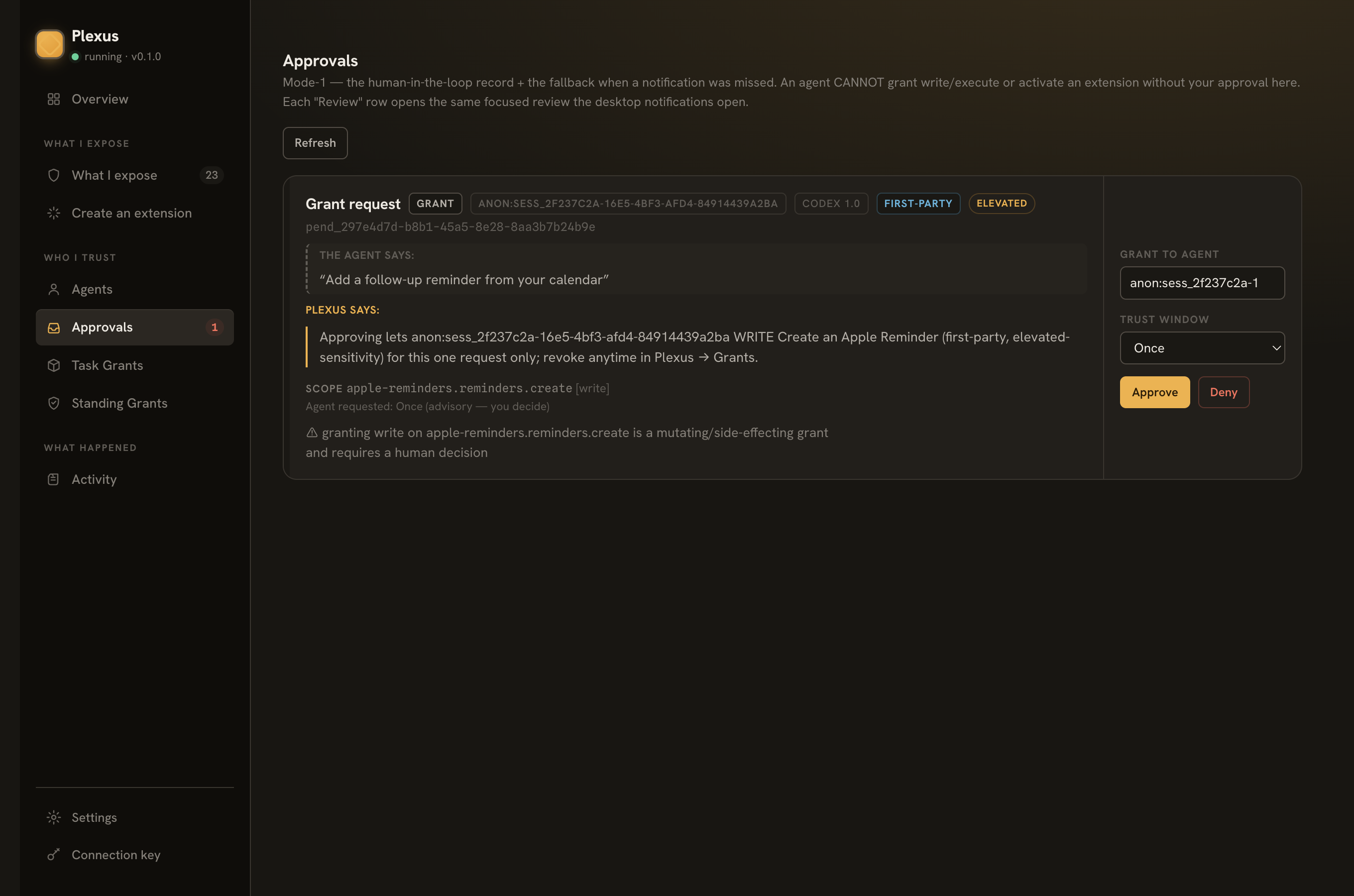
To broaden a connected agent's reach, grant more from the console (or re-run Connect an agent with a larger cap-set) — plexus-my-cc list then shows the new caps callable-now.
Part 2 — drive a real generic agent (Codex) against Plexus
Every agent that is not Claude Code takes the generic path: an instruction block in the project's AGENTS.md + a per-agent plexus launcher the agent runs by absolute path. Plexus is not an MCP server (there is no /mcp wire), so there is nothing to put in an agent's config.toml — the agent already has a shell, so it just runs its plexus command. Codex is the worked example.
B0. What the console's generic delivery gives you
Connect the agent in the console (same flow as Part 1) but pick the Generic / other agent type. Step 3 hands you three things:
- a setup command —
curl -fsSL http://127.0.0.1:7077/integration/<agentId>/setup.sh | bash, pasted in the project you run the agent from. The servedsetup.shis self-contained (it inlines the sanctioned engine — no repo needed), code-free, and key-free: it installs this agent's launcher at~/.plexus/agents/<agentId>/bin/plexus, pins the gateway, and lands the filled-in instruction block in./AGENTS.mdat the project root — the instruction teaches that absolute launcher path. - the enroll code, shown separately — a single-use
plx_enroll_…credential. The code is delivered ONLY in this connection-key-gated response, never baked intosetup.shor the instruction. Have your agent run~/.plexus/agents/<agentId>/bin/plexus enroll <code>once. - the instruction text, copy-able — the same
AGENTS.plexus.mdthe setup command lands, in case you'd rather paste it straight into your agent.
B1. Wire Codex up + enroll
In the project you run Codex from, run the generic setup command above. Or, from a repo checkout, use the Codex integration directly:
# From the project you run Codex in — lands the AGENTS.md block at ./AGENTS.md,
# teaching the absolute path of the repo shim (<repo>/integrations/codex/bin/plexus).
bash <repo>/integrations/codex/setup.sh
Either way, enroll the agent once with the one-time code the console showed you — by the launcher's absolute path, exactly the command the block teaches the agent:
~/.plexus/agents/<agentId>/bin/plexus enroll plx_enroll_…   # once — redeems the code for THIS agent's own PAT
~/.plexus/agents/<agentId>/bin/plexus list                  # sanity-check: the caps you granted show callable-now
(That's the console-installed launcher; with the repo-mode shim the command is <repo>/integrations/codex/bin/plexus — same verbs.)
The code redeems into the agent's own durable plx_agent_… token — the agent authenticates with that from then on and never handles your admin connection-key.
(Full Codex setup — automatic vs manual, project-root (default) vs global AGENTS.md — is in integrations/codex/setup.md. The portable generic files live in integrations/generic/.)
B2. Why --dangerously-bypass-approvals-and-sandbox
Codex sandboxes the commands it runs. The plexus command talks to the gateway over loopback HTTP (127.0.0.1). codex exec defaults to a read-only sandbox that blocks that loopback call, so Codex can't reach Plexus. For the session that drives Plexus, Codex has to be allowed to make the call. The blunt way is the flag:
codex exec --dangerously-bypass-approvals-and-sandbox "<task>"The flag removes the sandbox so the agent can talk to a local service — use it only for automation you trust on a machine you own. (The narrower, safer alternative is to grant network access in your Codex sandbox config instead of removing it wholesale.) It's a Codex CLI flag, not a Plexus one; Plexus's own authz — standing grants plus the pending-approval flow — still applies to every call.
B3. A worked task — read my calendar / create a reminder
With the gateway running (boot it with PLEXUS_FAKE_APPLE=1 bun run start for the deterministic Apple fixtures and no macOS TCC prompts — see Expose a source), and the Codex agent connected with both apple-calendar.events.list and apple-reminders.reminders.create in its cap-set — the create is a write, so tick its per-capability Standing opt-in at connect (that deliberate tick is the human approval; without it each create pends for you):
codex exec --dangerously-bypass-approvals-and-sandbox \
  "Use the plexus command: run 'plexus list' to see what's available, read today's
   events with apple-calendar.events.list, then create a follow-up reminder for the
   first event with apple-reminders.reminders.create. Use --json."
Codex follows the discipline its AGENTS.md teaches — list, then invoke — and runs something like:
exec   ~/.plexus/agents/<agentId>/bin/plexus list --json               succeeded
         → apple-calendar.events.list (read, callable-now),
           apple-reminders.reminders.create (write, callable-now) …
exec   ~/.plexus/agents/<agentId>/bin/plexus apple-calendar.events.list --input '{"start":"2026-06-25","end":"2026-06-26"}' --json
         → { "ok": true, "output": { "events": [ { "title": "Team sync", … } ] } }
exec   ~/.plexus/agents/<agentId>/bin/plexus apple-reminders.reminders.create --input '{"list":"Reminders","title":"Follow up on Team sync"}' --json
         → { "ok": true, … }
Both calls just work — you approved them at connect. The read you selected became a standing grant, and the write stands because you explicitly opted it in — each was a deliberate human approval, so neither call re-prompts you. Skip the write's opt-in and the same walkthrough still works, just with a human in the loop: the create pends, you approve it in /admin (Approvals tab), and the command continues. That per-use pend is also what an in-subset execute capability does (e.g. claudecode.run) — there the command prints a grant_pending_user notice and polls while telling you to approve it. And a capability you did not select at connect is outside this agent's authorized subset — it doesn't show up in plexus list at all, and a request for it is denied.
Gotchas
- macOS TCC (the first live Apple call prompts you). With
PLEXUS_FAKE_APPLEunset on a real Mac, the Apple sources shell out toosascript/JXA and the first live use of each triggers the macOS TCC consent dialogs. If you deny, the call fails with a precise "enable it in System Settings" message. For a hermetic run with no TCC, setPLEXUS_FAKE_APPLE=1. osascriptprovider perf on huge lists — Calendar/Reminders throughosascriptis slow on very large stores. Scope your queries (a day/week window, a specific list).- Codex's sandbox blocks loopback by default — re-read B2 if
plexus listinside Codex fails with a network error while the same command works in your own shell.
Part 3 — an in-context / HTTP agent (no install)
Some agents have no filesystem and no shell — a light in-browser agent, a serverless function, a cloud worker. They can't run setup.sh or a plexus CLI. They can make HTTP requests. The in-context form is for exactly them: nothing is installed; the agent is handed a pure-HTTP protocol instruction it pastes into its own context and follows with its own fetch/curl.
This is the same provisioning as Parts 1–2 — a one-time code + standing grants. Only the delivery changes: there is no compiled plugin and no CLI, so there is also no public bootstrap route (install.sh / setup.sh both 404 for an in-context agent). The instruction text and the one-time code ride only the connection-key-gated GET /integration/:agentId JSON.
C0. What the console's in-context delivery gives you
Connect the agent in the console (same flow as Part 1) but pick the In-context / HTTP (no install) form. The install step hands you two things:
- the protocol instruction, copy-able — a self-contained, code-free + key-free text (the gateway URL already filled in) that teaches the whole pure-HTTP flow. Paste it straight into your agent's context / system prompt.
- the one-time enroll code, shown separately — a single-use
plx_enroll_…credential, delivered ONLY in this connection-key-gated response, never inside the instruction. Hand it to the agent so it can enroll itself.
The API equivalent (an admin action — needs the connection-key):
export KEY=$(cat ~/.plexus/connection-key)     # ADMIN credential — never given to the agent
curl -s -H "Host: 127.0.0.1:7077" -H "content-type: application/json" \
  -H "X-Plexus-Connection-Key: $KEY" \
  -X POST "http://127.0.0.1:7077/admin/api/agents/connect" \
  -d '{"agentId":"cloud-bot","agentType":"in-context","capabilities":["obsidian.vault.read"]}'
# then fetch the instruction + one-time code (connection-key gated):
curl -s -H "Host: 127.0.0.1:7077" -H "X-Plexus-Connection-Key: $KEY" \
  "http://127.0.0.1:7077/integration/cloud-bot"       # → { agentType:"in-context", instruction, enrollCode, enrollHint, … }
C1. The agent bootstraps itself from the protocol — pure HTTP
The pasted instruction tells the agent to self-bootstrap from the gateway's own self-description — it never guesses endpoints or auth:
- DISCOVER —
GET /.well-known/plexus(no auth) → the gateway identity plusauth.requestShapes(how to call each endpoint),auth.enrollment(how to redeem the code), and acapabilitiesViapointer: enroll and handshake to receive the capabilities Plexus authorized this agent to access. The live document is authoritative; the agent follows it. - ENROLL —
POST /agents/enroll { "code": "plx_enroll_…" }→ the agent's own durable PAT (plx_agent_…), returned once. The agent stores it itself (its own memory / context / secret store) — there is no file on disk to land it in. - HANDSHAKE —
POST /link/handshakewithAuthorization: Bearer <PAT>(no body) → asessionId+ the manifest of capabilities the owner authorized this agent — full detail per entry (describe, schemas, verbs), scoped to its authorized subset. - GRANT —
PUT /grants { "sessionId": …, "grants": { "<capabilityId>": "allow" } }→ a scoped JWT (a standing grant — a read the owner selected at connect, or a cap the owner explicitly made standing — short-circuits; any other in-subset request pends for the owner; a request outside the subset is denied). - INVOKE —
POST /invokewithAuthorization: Bearer <scoped-jwt>and{ "id": "<capabilityId>", "input": { … } }→ the real result.
Read each call's input shape from the manifest — not from prose
To build a call's input, the agent reads the structured JSON Schema at manifest.entries[].io.input from its handshake response — not the capability's human summary. That schema is authoritative for any capability, so the same discipline works for a vault read, an Apple reminder, or a capability that didn't exist when the instruction was written. The instruction says this explicitly.
The whole appendix below is what the CLI forms hide inside the plexus engine — for an in-context agent it is the integration, and the pasted instruction walks it verbatim. Note what the agent is never told to do: hold or present the admin connection-key (plx_live_…). Its only credential is the PAT it minted at enroll; the connection-key stays the owner's, out of band.
Appendix — under the hood (the PAT wire)
You never touch this to connect an agent — the plexus command does it all. But this is exactly what it does on the wire (authoritative: cited file:line in the security model §2).
- DISCOVER —
GET /.well-known/plexus(unauthenticated). Gateway identity + theauthadvertisement (the enroll / handshake URLs) + acapabilitiesViapointer — the capability list itself arrives after enroll + handshake, scoped to what the owner authorized this agent. - ENROLL —
POST /agents/enroll { "code": "plx_enroll_…" }. The code is the credential here; the connection-key is never accepted. On success it returns the durable PAT in plaintext once — the command stores it locally and it is never recoverable again:shcurl -s -H "Host: 127.0.0.1:7077" -H "content-type: application/json" \ -X POST "http://127.0.0.1:7077/agents/enroll" \ -d '{"code":"plx_enroll_…"}' # → { "pat": "plx_agent_…", "agentId": "my-cc" } - HANDSHAKE —
POST /link/handshakewithAuthorization: Bearer plx_agent_…. The PAT is verified and the session is bound to the realagentIdit resolves to (a client can never self-assert another agent's identity). Returns asessionId- the agent's manifest — every entry the owner authorized it to reach, in complete detail; never the whole catalog.
- GRANT —
PUT /grantswith theX-Plexus-Session: <sessionId>header and{ "grants": { "<capabilityId>": "allow" } }. A capability with a standing grant — a read the owner selected at connect, or one the owner explicitly made standing — short-circuits to a scoped token; any other capability inside the agent's authorized subset pends for the owner (grant_pending_user+pendingId; pollGET /grants/status?pendingId=…with the same session header); a request outside the subset is denied — no owner card, no pend. - INVOKE —
POST /invokewithAuthorization: Bearer <scoped-jwt>and{ "id": "<capabilityId>", "input": { … } }. One result contract (ADR-017):{ id, ok, output?, error?, auditId }; a denial isok:falsewith a closed-unionerror.code.
The reference implementation of this exact chain is examples/min-agent/ — the bundled engine (tools/plexus-cli/plexus) is the sanctioned, Floor-verified version of it that every compiled plugin ships. Note what an agent is never told to do: read an on-disk key, present the connection-key at handshake, or mint its own token. The only advertised forward path is the audited, owner-approved one.
Where to go next
- Author an extension — give an agent a capability the gateway doesn't ship (e.g. a vault write), and let a coding agent author the manifest from a description.
- Expose a source — the bundled sources (Obsidian, Apple Calendar/Reminders/Notes/Mail/Contacts/Photos, Shortcuts, browser, browser control, Claude Code): capability ids, grants, and prerequisites.
- The protocol — the frozen wire contract and ADRs (ADR-016 endpoint advertisement, ADR-017
/invoke, ADR-018 unified trust model).