
Watch the trust loop
Where the gateway runs is plumbing. This is Plexus: a read that flows, a protected read that stops and waits for you, an approval that lets it through — or a denial that closes it — and a trail that remembers all of it. Everything else in the docs is a variation on this loop.
You don't need to have run anything to follow along. The screenshots and terminal output below are from a real gateway walking the built-in demo end to end.
1. The mental model you're building
Plexus hands an agent a ticket, never a key. The connection-key is your badge — it opens the management console, and it never leaves your side. When you connect an agent, it enrolls for its own per-agent PAT: a ticket that says who it is, nothing more. Every capability is default-deny — a ticket lets an agent knock, not walk in. Low-risk reads on sources you added yourself can be pre-granted so they flow; a write, an execute, or anything you marked protected stops at the door and waits for you. That pause is the whole product.
2. Expose the demo — one open folder, one protected
The built-in onboarding creates ~/PlexusDemo with two folders that teach the entire model in one screen. Plexus intro (demo-intro) is exposed open-read — the auto posture, for low-risk reads on a source you added yourself. Your secret (your-secret) is protected (approval: "ask") — every first use, even a read, pends for you.
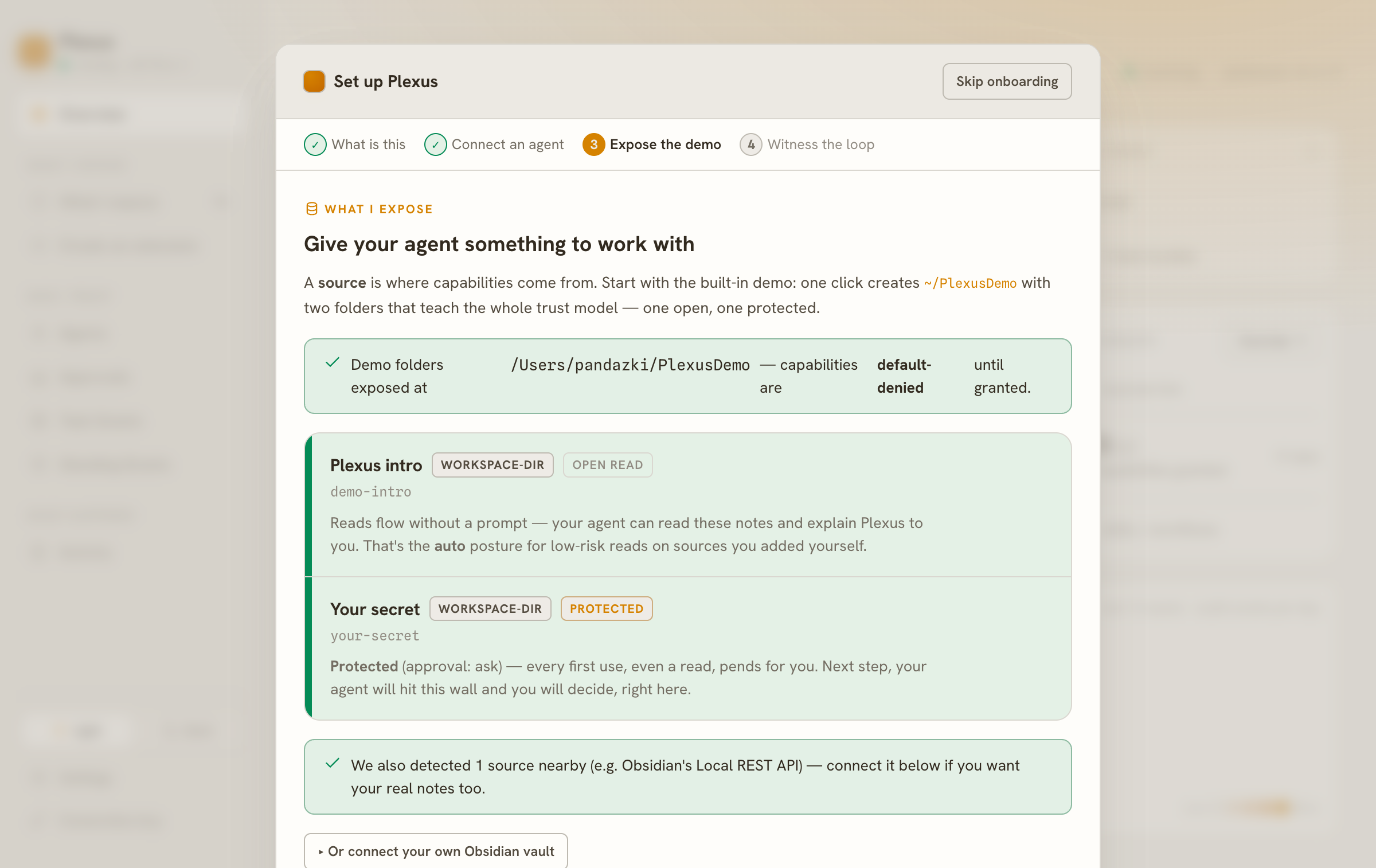
Two folders, two postures. That difference — open-read versus protected — is what the rest of the loop makes concrete.
3. Connect your agent — see what it can and can't do
Once the agent enrolls, it discovers its own surface with list. It doesn't guess: the gateway tells it exactly what's callable now and what will pend.
$ plexus-demo-cc list

CALLABLE NOW — standing grant, the call just works (1):
  ● demo-intro.read — Read workspace file (read)  [managed, low]

NEEDS APPROVAL — not standing / elevated; the owner approves on first call (2):
  ○ your-secret.read — Read workspace file (read)  [managed, low]
  ...
Same verb — read — on both. The line between them isn't the action; it's the posture of the source you exposed. demo-intro.read stands. your-secret.read needs you.
4. Act one — read the intro, it flows
The open-read capability has a standing grant, so the call just works — no prompt, no pause.
$ plexus-demo-cc demo-intro.read welcome.md
# Welcome to Plexus
You are reading this through Plexus — which means the loop already works.
...
The agent read a file on your machine, and you weren't interrupted — because you pre-decided this source was safe to stand. That's the point of the auto posture: it earns its silence.
5. Act two — read the secret
Now the same read, aimed at the protected folder. This is where Plexus stops.
It pends — nothing happens without you
The call doesn't fail and it doesn't flow. It waits, and the approval card appears in your console. The card is built for a human decision: who is asking, what exactly it wants (your-secret.read [read], tagged managed / low), and for how long — you pick the trust-window; the agent's request is advisory.
![The Plexus approval card for the protected read. Header "Grant request", tags GRANT / DEMO-CC / PLEXUS-CLI / MANAGED / LOW, pending id pend_8d819e81-…. Plexus says: "Approving lets demo-cc READ Read workspace file (managed, low-sensitivity) for up to 7 days; revoke anytime in Plexus → Grants." Scope: your-secret.read [read]. A warning notes source "your-secret" is protected (approval:"ask") — granting read on your-secret.read awaits the owner's decision. On the right: Grant to agent "demo-cc", Trust window "7 days", and Approve / Deny buttons.](/screenshots/guide/04-approval-card.png)
You are the approver, standing right here. Two ways this goes.
Allow it → the read completes
Approve with a trust-window, and the launcher — which was blocking this whole time — unblocks and the call goes through. The agent gets the file it was after:
$ plexus-demo-cc your-secret.read secret.md
plexus: 'your-secret.read' is awaiting the owner's approval — waiting (up to 15 min). Approve it in the Plexus console: http://127.0.0.1:7077/admin. (--no-wait or PLEXUS_APPROVAL_WAIT_MS to tune.)
# (owner approves in console)
plexus: approved — invoking 'your-secret.read'.
# The protected note
demo-secret: tangerine-42 🍊
Within your trust-window, this same read now stands — until you revoke it.
Deny it → the call closes, hard
Or don't. Deny, and the agent's call ends — no data, no retry loop, a clean non-zero exit it can detect and reason about.
$ plexus-demo-cc your-secret.read secret.md
plexus: 'your-secret.read' is awaiting the owner's approval — waiting (up to 15 min). Approve it in the Plexus console: http://127.0.0.1:7077/admin. (--no-wait or PLEXUS_APPROVAL_WAIT_MS to tune.)
# (owner denies in console)
plexus: the owner DENIED 'your-secret.read'.
$ echo $?
77
Exit 77. The agent learns "no" as a fact, not an error to paper over. Both outcomes are the lesson: the gate is real in both directions.
6. The trail — every move is on the record
None of this is off-book. The Activity log is append-only and redacted: every handshake, grant, token, invoke, and revoke, with who did what. Read it top to bottom and the whole story is legible — the deny, the pending, the earlier allow-then-revoke, the successful invokes with their token ids.
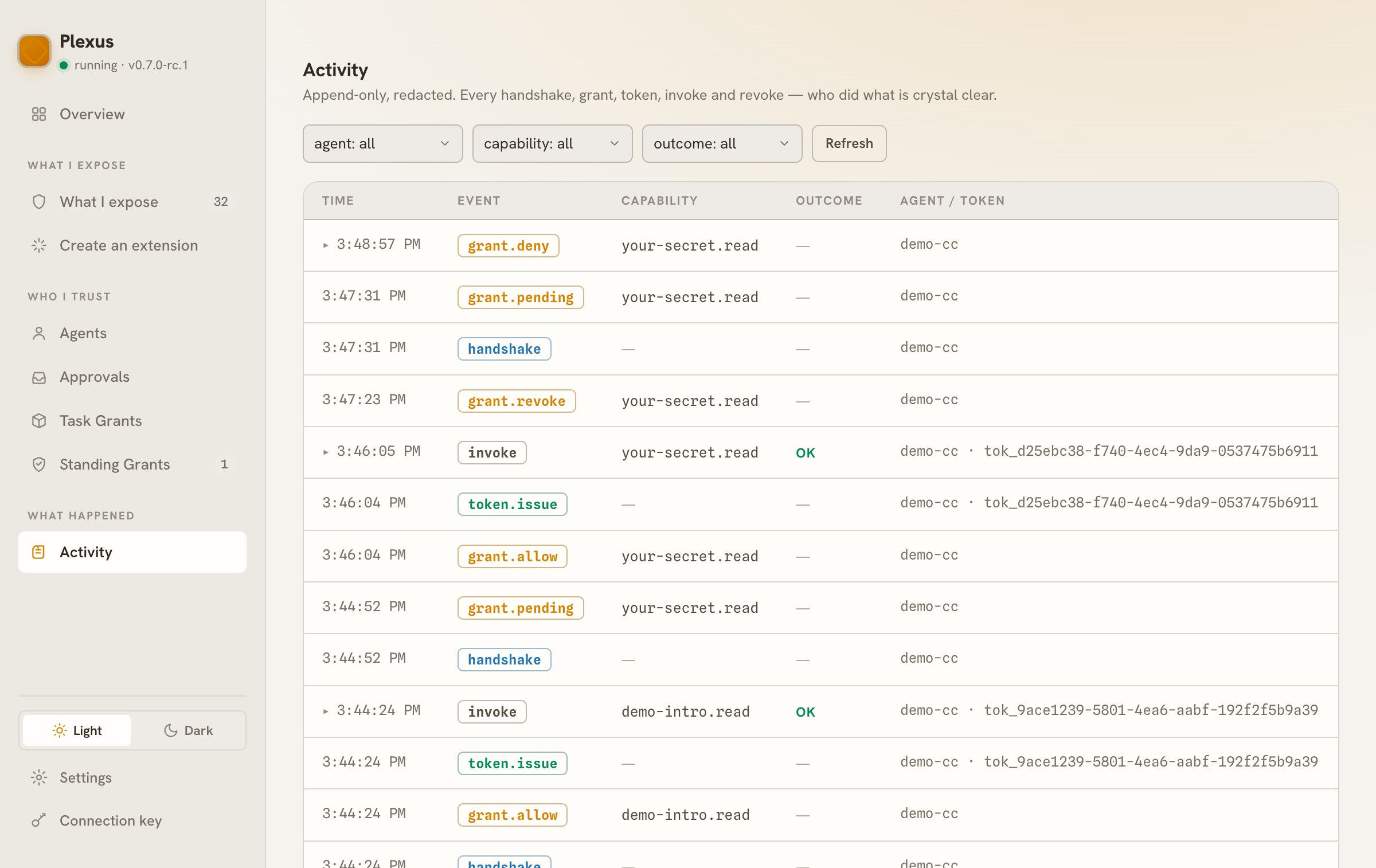
This is what "fully-audited" means in practice: not a promise, a ledger. Nothing an agent does through Plexus is invisible to you.
7. Revoke — one switch, everything fails closed
Grants aren't forever. Revoke one in Grants, and the agent's very next call fails closed — no redeploy, no key rotation, no chasing down copies of a secret, because there never was a copy to chase. The ticket is torn up; the door is shut. That asymmetry — trivial to grant, trivial to revoke, impossible to leak — is the reason the loop is worth the pause.
That's Plexus, whole. A read that flows because you allowed it, a read that stops because you didn't, a decision you make with full context, and a record that never forgets. Where you run the gateway only changes the length of the wire.
- The security model → — the authoritative trust boundary: connection-key vs per-agent PAT, the execute-defaults-to-per-use rule (standing only by explicit owner opt-in, per agent and capability), exactly what publishing exposes.
- The concepts → — the mental model underneath (Connector → Source → Capability, provenance, the three clocks, the self-describing Floor).
- Connect an agent → — the first-agent flow in depth, with a real
codexagent too.